











SEO for lawyers: 10 quick wins to get more quality enquiries (2026 guide)


Why lawyers need SEO (but shouldn't become SEO specialists)
You didn't go to law school to become a digital marketer. You bill for legal expertise, not content creation.
The problem: Referrals are unpredictable, word of mouth is slow, and traditional advertising costs thousands with no guarantee. Meanwhile, you're time-poor. Between matters, court, and billables, who has time for marketing?
The solution: SEO captures people at the exact moment they need a lawyer. When someone searches "personal injury lawyer Sydney" or "criminal lawyer Melbourne" at 11pm, they're not browsing. They're ready to engage.
The good news? You don't need to become an SEO expert. This guide gives you 10 fast, practical wins you can implement now. Some in under 10 minutes.

What is SEO for lawyers in 2026? (and why everything's changed)
People search differently now
Search engine optimisation isn't what it was in 2015. It's not about stuffing "divorce lawyer Sydney" into every paragraph anymore.
People search differently now. Not just because of AI, but because of how we actually use technology in daily life:
Voice assistants: "Hey Siri, find me an employment lawyer near me"
Car dashboards: Speaking searches while driving
Smart devices: Quick queries on phones, tablets, watches
AI chat tools: Using ChatGPT or Google's AI Overviews for initial research
Zero-click searches: Google answering questions directly in search results
People no longer type robotic keywords. People search the way they speak when searching online.
People don't just type "personal injury claim cost" anymore. They ask real questions like "How much compensation will I get for a car accident?" or "Can I sue if I slipped at work?"
Google now understands intent, emotion, local context, and legal nuance. It reads real-world scenarios, not just keywords, and it expects clear proof of experience, expertise, authority, and trust.
Modern legal SEO is actually straightforward: match intent, prove locality, and build trust. This is the foundation of any effective lawyer SEO strategy.
What's E-E-A-T? Think of it as Google's way of checking: "Is this person actually qualified to give this advice?" For lawyers, it means showing you're a real lawyer, with real experience, who actually practises in this area. Google needs proof, not just claims.
Why bother? (you're already busy)
SEO for law firms takes 3-6 months, but once you rank, you get enquiries without paying per click. Unlike referrals, it's predictable. Organic traffic from search engines brings clients actively looking for your services.
Want enquiries right now? LawConnect helps you grow your client base by connecting you with high-quality enquiries from people actively seeking legal help in your area of expertise, while you continue building your long-term SEO strategy. Benefit from established trust and visibility today.
10 fast SEO tactics to get more enquiries
Win 1: target high-intent keywords (not broad ones)
What is this?
Most lawyers in Australia chase broad keywords like "[Practice area] + lawyer" or "[Practice area] + lawyer Sydney" because they have high search volume. But those keywords are dominated by directories, comparison sites, and firms with massive SEO budgets. Broad terms are usually dominated by directories and large firms, while suburb/service terms tend to be far less competitive.
Why does hyper-local bring better enquiries?
Here's the trick: when someone searches for a lawyer in their area, Google interprets that as "lawyers near [their location]" and serves local search results.
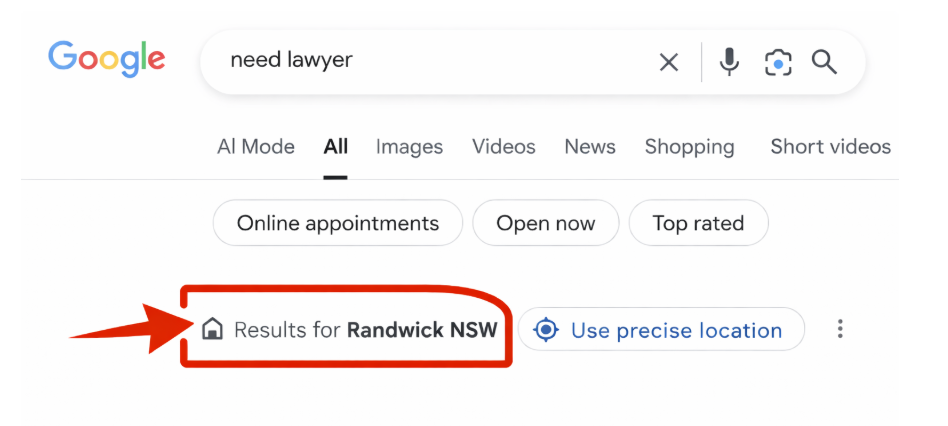
So instead of optimising your page for just "criminal lawyer," you optimise for "criminal lawyer [suburb]". Not because people type it (they don't), but because that's how you tell Google you're the local expert.
The high-intent keywords you actually target are specific and show intent to hire:
"personal injury lawyer [suburb]"
"no win no fee lawyer [suburb]"
"drink driving lawyer [suburb]"
"visa refusal lawyer [city]"
"contested will lawyer [suburb]"
"divorce application help [suburb]"
Lower competition, and the people searching them are ready to hire.
Lower search volume × higher intent × less competition = more enquiries for less effort.
This is how small firms win: stop fighting for impossible keywords, own your local patch instead.
Your keyword strategy follows a simple formula
The service + location formula
Start here: [Practice area] + [suburb/city]
Examples:
Personal injury lawyer Newcastle
Criminal lawyer Randwick
Immigration lawyer Robina
Then go deeper: [Specific service] + [suburb/city]
Car accident lawyer Robina
Drink driving lawyer Newcastle
Partner visa lawyer Randwick
The more specific you are, the less competition you face.
What to do now
Pick your three most common practice areas. Write down:
Service + your suburb/city (e.g., "criminal lawyer [your suburb]")
Specific sub-services + your suburb (e.g., "drink driving lawyer [your suburb]," "assault charge lawyer [your suburb]")
If you serve nearby suburbs, add those too (e.g., variations for neighbouring areas)
That's your starting list. 10–20 keywords focused on your location.
If you want to go deeper later, here are three quick methods:
Method 1: People Also Ask and Related Searches
Search your main keyword (e.g., "immigration lawyer Sydney"). Check "People also ask" boxes and "Related searches" at the bottom. Write them down.
Method 2: Google Ads Keyword Planner
Go to ads.google.com and set up a free account. You might need to enter your credit card, but don't worry. You won't be charged unless you actually run ads. Click "Tools" → "Keyword Planner." Enter your service + location to see search volumes and variations.
Method 3: ChatGPT
Ask: "I'm a [criminal defence] lawyer in [Melbourne, Victoria]. Generate 30 high-intent local keywords. Include: service + location, sub-service + location."
Don't waste time chasing search volume data right now. The goal is to get enquiries, not perfect keyword research. List what you actually do and variations, include your locations. That's your starting point. The next section shows you exactly where to use these keywords.
Win 2: put keywords in the right places (without overloading)
What is this?
Once you know your keywords, you need to use them where Google looks first. But this isn't about cramming keywords into every sentence. It's about clear, natural placement in the spots that matter.
Why does this bring better enquiries?
Google scans your page for signals. If your page is about drink driving law in your area, but your title says "Expert Legal Services," Google doesn't know what you do or where you are. Clear keyword placement tells Google, and the searcher, exactly what this page covers.
The places that matter
1. Title tag (what shows in search results)
This is the first thing Google reads and the first thing searchers see. Keep it under 60 characters so it doesn't get cut off.
Bad: "Legal Services | Smith Legal" Good: "Personal Injury Lawyer Brisbane | Smith Legal"
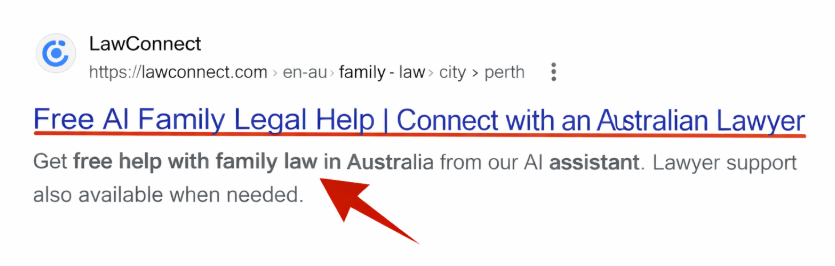
2. H1 (the main heading at the top of the page)
This should match your title, or be even clearer: "Personal Injury Lawyer in Brisbane. Compensation Claims & No Win No Fee"
One page = one main topic + one location. Don't try to rank for personal injury AND criminal law on the same page.
3. First paragraph
Open with intent: "If you're looking for a personal injury lawyer in Brisbane, we help clients across Queensland with car accident claims, work injury compensation, and public liability matters. No win, no fee."
This confirms to Google, and the reader, that they're in the right place.
4. H2 and H3 subheadings
Use related keywords and variations in your subheadings naturally:
"How Our Brisbane Personal Injury Lawyers Can Help"
"Types of Compensation Claims We Handle"
"No Win No Fee. What It Means for Your Claim"
5. Meta description
This doesn't directly affect rankings, but it affects whether people click your result: "Personal injury lawyer in Brisbane specialising in car accidents, work injuries, and public liability. No win, no fee. Call [number] for a free consultation."
Your meta description should be 120-130 characters maximum.
6. Image file names and alt text
Name images descriptively: "personal-injury-lawyer-brisbane-office.jpg" Add alt text: "Personal injury law office in Brisbane"
7. URL/Slug
Keep URLs simple and keyword-rich: Example: yourfirm.com.au/personal-injury-lawyer-brisbane/ Not: yourfirm.com.au/services/page-7/
8. Throughout the content
Mention your keyword naturally 3–5 times throughout the page. Use synonyms and related terms:
"personal injury lawyer Brisbane" (exact keyword)
"Brisbane compensation lawyer" (variation)
"injury claim solicitor serving Brisbane" (related)
"compensation claims across Queensland" (contextual)
DON'T stuff keywords unnaturally. If it sounds robotic, rewrite it.
The golden rule: one keyword per page
Each page should target ONE main keyword and its variations. "Criminal lawyer Parramatta" is your main keyword. Variations like "Parramatta criminal defence lawyer" or "criminal law services Parramatta" are fine on the same page. But don't try to rank for "criminal lawyer Parramatta" AND "DUI lawyer Parramatta" on one page. That confuses Google.
One page = one focus.
Now you've targeted the right local keywords AND placed them naturally throughout your page. You're the expert Google will rank. Now which pages to create. This is the next step.
Win 3: build money pages first (then support them)
What is this?
A "money page" is a page that directly brings in clients. For most law firms, that's your practice area pages: Personal Injury, Criminal Defence, Immigration, Family Law.
These should be your first priority when implementing SEO marketing for lawyers. Everything else (blog posts, FAQ pages, case studies) supports them as part of your overall content strategy.
Why does this bring better enquiries?
Google ranks pages, not websites. If your homepage says "we do immigration law" but you don't have a dedicated immigration page, you won't rank. If you have a strong immigration page supported by related content, Google sees you as an authority.
Think of it like building a case. Your money page is your primary evidence. Supporting pages are your corroborating documents. This is core to SEO for legal firms.
The structure that works
Main page: Your primary practice area (e.g., Criminal Defence)
This covers your core service in your location. It includes:
What you do
Who you help
Why you're qualified
How to get started
Supporting pages:
Drink driving charges
Assault charges
Drug offences
Bail applications
Each supporting page links back to your main Criminal Defence page. The main page links down to them. This structure tells Google: "This firm knows criminal law deeply."
Internal linking logic
Link up: Every supporting page should link to your main practice area page
Link down: Your main page should link to relevant sub-pages
Link across: Related pages can link to each other (e.g., drink driving page links to licence suspension page)
This isn't complicated. Just ask: "If someone's reading this page, what related page would help them next?"
Here's the real tip
Whether it's your main practice area page or a supporting page, each one needs local proof points. The next section shows you exactly what to include on every money page to prove you're the local expert.
Win 4: prove you're local (Google ranks local signals)
What is this?
Google ranks lawyers locally. Someone in Brisbane searching for a lawyer won't see results from Perth. But Google needs proof you're actually local, not just a national firm with a virtual office.
Local authority signals are the details that show you know the area, work in the area, and serve clients in the area.
Why does this bring better enquiries?
Clients trust local lawyers. They want someone who knows the local courts, the local process, the local regulators. When your website mentions specific courts or tribunals, it builds credibility.
And Google rewards this. Pages with genuine local references rank higher than generic pages. This local focus is essential for improving your search engine ranking.
Every service page needs local proof to rank and convert. Here's what to add:
1. Your office address and location
Display your address in the footer of every page
On a dedicated contact/office page: embed a Google Map, mention nearby landmarks, add parking instructions
If you don't have a physical office: "We serve [your area] and surrounding suburbs"
2. Local courts, tribunals, and agencies where you appear
Don't list every court or tribunal in Australia. List where you actually practice:
Criminal defence examples:
"We regularly appear at Melbourne Magistrates' Court and County Court"
"Our team appears weekly at Downing Centre Local Court"
Immigration examples:
"We handle matters before the Administrative Appeals Tribunal (AAT)"
"We assist with Department of Home Affairs applications and reviews"
3. Local process knowledge
Drop in details that prove insider knowledge:
"Most drink driving charges in [your area] are heard [day/time] at [court name]"
"Partner visa applications often take many months to process (sometimes over a year)"
"In Victoria, workplace injury claims are managed through WorkSafe Victoria"
4. Nearby suburbs or regions you serve
Mention them naturally: "We assist clients across [main area], [suburb 1], [suburb 2], and [region]."
5. Local experience and results
Quantify your local work:
"We've helped 200+ Queensland clients with work injury claims"
"Our team has appeared at [local court] over 500 times"
6. Lawyer bios with local credentials
On your "About" or "Our Team" page (link to it from your money pages): "John Smith has practised criminal law in Melbourne for 12 years and regularly appears at Magistrates' Court and County Court."
7. Local agencies and regulators (practice-specific)
Mention state or territory-specific bodies where appropriate:
"We can assist with Legal Aid Victoria applications"
"If you're dealing with Centrelink disputes..."
"We work with the AAT for visa refusal reviews"
8. Local testimonials and reviews
Display client reviews on your service pages. Reviews that mention your area or local courts/tribunals are ideal: "John from Brisbane: Sarah handled my work injury claim professionally and knew exactly how to deal with WorkCover."
But any genuine client reviews add trust and authority. Don't wait for the "perfect" local review. Display what you have. The next section shows you how to get more reviews consistently.
Win 5: how to get more Google reviews (through your business profile)
What is this?
Google reviews build trust and improve rankings. A lawyer with 40+ recent reviews ranks higher and converts better than one with 5 old reviews.
Why does this bring better enquiries?
Someone comparing three lawyers will call the one with 4.8 stars and recent feedback. Reviews reduce objections and prove you deliver results.
Set up your Google Business Profile (if you haven't)
If you don't have a Google Business Profile yet, set one up here: business.google.com
It's free and takes 10 minutes. You'll need to verify your business address (Google sends a postcard with a code).
How to get more reviews (without being pushy)
At the end of a successful matter, send a simple message: "Hi [Client], thanks for trusting us with your matter. If you were happy with how we helped you, we'd really appreciate a Google review. It helps other people find us when they need legal help. Here's the link: [direct review link]. Thanks again."
Send this via email or SMS. That's it. No pressure, just a clear ask.
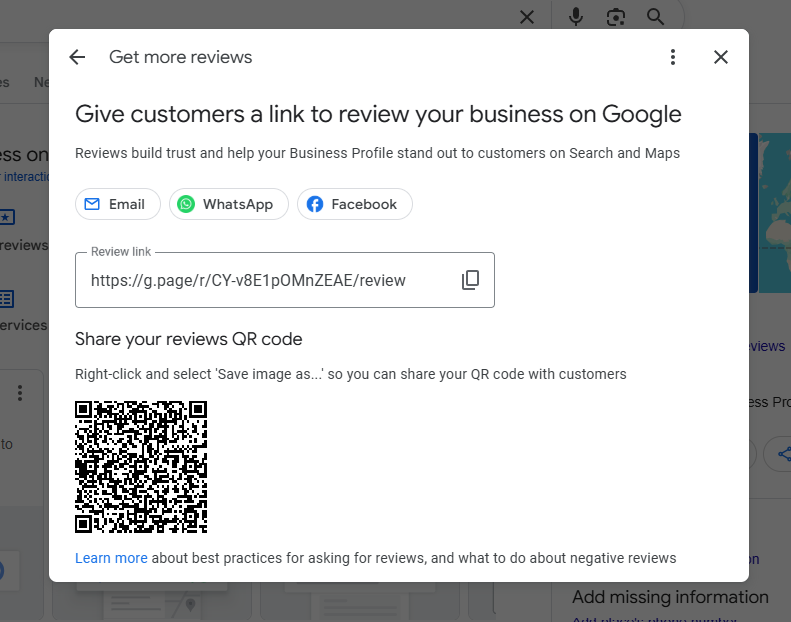
How to find your direct review link
Log into your Google Business Profile
Click on "Get more reviews" or "Ask for reviews"
Google gives you a short link (e.g., g.page/yourfirm/review)
Save this link. Use it in every review request
This link takes clients straight to the review form. No searching, no friction.
How to respond to reviews
Respond to every review (good or bad). Google tracks interaction between you and your reviewers. The more you respond, the better your visibility. Businesses with high response rates signal they're active, legitimate, and engaged with clients.
Good reviews: Keep it brief and genuine
"Thanks John! We're glad we could help with your work injury claim. All the best with your recovery."
Bad reviews: Stay professional, don't argue, offer to discuss offline
"Thanks for your feedback. We take all concerns seriously. Please contact us directly at [number] so we can discuss this further."
Even responding to negative reviews helps your rankings. It shows Google you're active. And it gives you a chance to naturally mention keywords: "Thanks for trusting our criminal defence team in Melbourne."
Display reviews on your website
Use a plugin or widget to pull your Google reviews onto your homepage and service pages. Options:
Google Reviews Widget (WordPress)
Trustindex
EmbedSocial
Visitors who didn't come from Google Maps will see your reviews and trust you more.
This section focused mainly on reviews inside your Google Business Profile. There's a lot more that can be optimised inside it. We'll cover full local SEO for lawyers in a separate guide. For now, here are two quick things you can fix immediately:
Local SEO: category and NAP consistency
Choose the right primary category in your Google Business Profile:
"Family Law Lawyer" (not just "Lawyer")
"Criminal Defence Lawyer"
"Personal Injury Lawyer"
"Immigration Lawyer"
"Drink Driving Lawyer"
The more specific, the better you'll rank for relevant searches.
Keep your NAP (Name, Address, Phone) identical everywhere:
Google Business Profile
Website footer
Legal directories
Social media
If your address is listed differently across platforms (for example, "Level 2" on your website but no level on Google, or a different suite number), Google may treat them as separate locations, which can hurt your local rankings.
Win 6: add symptom-based FAQ questions to your pages
What is this?
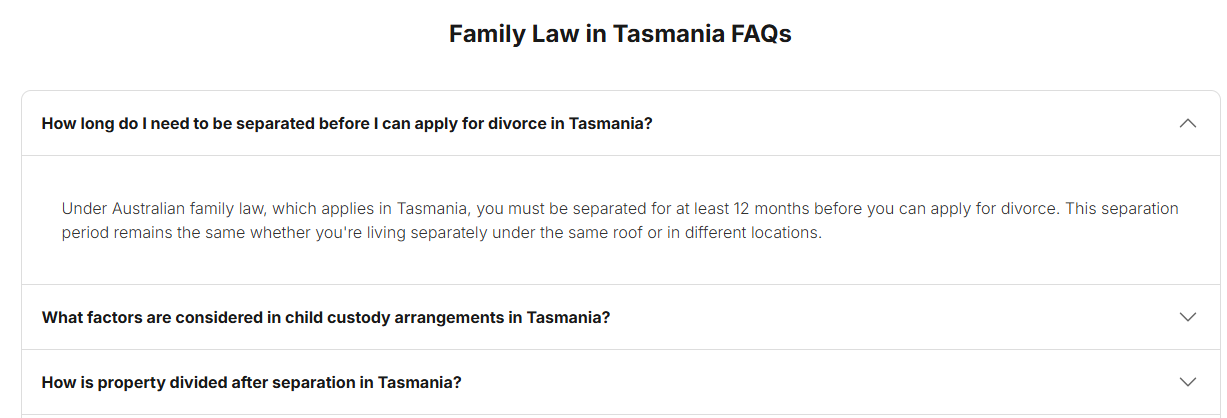
You've built your money pages and optimised for local keywords. Now add FAQ sections to capture long-tail searches. The full questions people actually ask.
People don't search in legal jargon anymore. Many people search in plain language:
"My partner took the kids. What can I do?" (family law)
"I crashed my car. Can I claim?" (personal injury)
"Will I lose my licence for drink driving?" (DUI)
"My visa got refused. Can I appeal?" (immigration)
These are conversational, symptom-based queries.
FAQs target these longer searches. They sit between informational and high-intent. Someone with a real problem looking for answers.
Why does this bring better enquiries?
FAQ pages rank fast because they match exactly how people search. Someone asking "What happens if I breach an AVO" might not hire you today. But when they get served papers, they remember your site.
Google loves FAQs because they answer questions directly. And when someone lands on your FAQ, they've already read your answer. When they call, they're more qualified prospective clients.
Symptom-based FAQs (not legal jargon)
Write FAQs in client language, not lawyer language.
Bad: "Breach of AVO" Good: "What happens if I accidentally contact someone who has an AVO against me?"
Bad: "Partner visa processing times" Good: "How long does a partner visa take in Australia?"
Bad: "Personal injury damages assessment" Good: "How much compensation will I get for a car accident?"
How to find questions
You already know them. They're what clients ask in every first meeting. Then check:
Google autocomplete (type your service + "how," "what," "can I")
"People also ask" boxes
What to do now
Pick one service page. Add 4–6 questions clients always ask. Start with what you know.
Practice-specific FAQ guides: For detailed FAQ examples in your practice area, see our dedicated guides for personal injury, family law, divorce, criminal defence, DUI, and immigration SEO.
Win 7: create a "cost" page (can significantly lift conversions)
What is this?
FAQs work well across your pages, but cost deserves its own page. People actively search for pricing, so a dedicated cost guide lets you target those keywords properly in the title, meta description, and headings.
One of the most-searched questions across all practice areas is: "How much does a [type of lawyer] cost?" Most law firms avoid this. They say "contact us for a quote" or "fees vary."
But people hate that. They want a ballpark. Even if you can't give exact pricing, a cost page that explains how you charge and what influences cost builds trust, and converts.
Why does this bring better enquiries?
Cost pages rank well because few firms publish them. And when someone lands on your cost page, they're serious. They're not browsing. They're budgeting.
A good cost page also filters. Someone who sees your range and still calls is more likely to be a fit. Someone who wanted cheaper knows upfront and doesn't waste your time.
What to include (safely)
You don't need to list exact fees. Just give structure:
1. Price ranges
"Most [service type] matters cost between $[X]–$[Y] depending on complexity. Contested matters that go to hearing typically cost $[X]–$[Y]+."
2. Cost factors
"Your legal costs depend on:
Whether the matter is contested or agreed
How much evidence or documentation is required
Whether there are disputes or complications
Court or tribunal appearances needed"
3. How you charge
"We charge by the hour for most matters. Our hourly rate is $[X]. We provide a cost estimate upfront and update you regularly throughout the matter."
Or for personal injury: "We work on a no win, no fee basis. You don't pay unless we win your case."
4. What's included
"Our fees include:
Initial consultation and advice
Drafting documents or applications
Negotiation with the other party or their lawyer
Court or tribunal appearances (if required)"
5. Engagement questions
End with: "If you'd like a detailed cost estimate for your specific matter, book a consultation and we'll walk through the likely timeline and fees."
Win 8: record voice notes after matters, turn into case studies
What is this?
Every matter you work on is potential content. Not the confidential details, but the process, the issue, the outcome. Real case studies beat generic content because they show actual experience.
This isn't about writing lengthy articles. It's about creating content efficiently by turning closed matters into short case summaries in 10 minutes.
Why does this bring better enquiries?
When someone reads "We recently helped a client defend a drink driving charge at [local court]," they see proof you do this work. Generic content ("We handle drink driving") says nothing.
Case studies also help with E-E-A-T (Experience, Expertise, Authoritativeness, Trustworthiness). Google's way of measuring whether you're a real practitioner. Real examples rank better than theory.
They also target long-tail keywords. "[Practice area] [location] successful outcome" has almost zero competition.
The voice note method
After each hearing, mediation, or consult, record a 30-second voice note on your phone:
"Today a client came in with a work injury claim. Employer disputed liability, but we found safety breaches in their procedures. Negotiated a settlement before it went to hearing."
Then paste the transcription into ChatGPT or Claude and ask: "Summarise this into a case study for my website. Focus on: the legal issue, what we did, the outcome, and why it matters. Anonymise all details."
That's it. One voice note per matter. AI turns it into a publish-ready case study in 30 seconds.
How to do it ethically
Anonymise everything:
No client names
No opposing party names
No identifiable details (unless you have written consent)
Focus on:
The legal issue
What you did
The outcome
Why it matters
Important: Don't publish anything that could identify a client, and avoid implying guaranteed outcomes. Every case is different, and results vary.
Do this once or twice a month. In a year, you'll have 24 real examples that outrank every generic competitor.
Practice-specific case study templates: Each of our practice-specific SEO guides includes 2 detailed case study examples tailored to that area of law, showing you exactly what to include.
Win 9: use Google Search Console for quick wins What is this?
Google Search Console (GSC) shows you which pages are indexed, what keywords you rank for, and your exact position for each.
This is where you find quick wins. Keywords you're close to ranking for.
Why position matters: There's a saying in SEO: "The best place to hide a dead body is on page two of Google search results." Most people never scroll past page 1. They rewrite their search instead.
Page 1 = positions 1–10. Page 2 = positions 11–20.
If you're position 9, you're barely on page 1. Position 11? You're invisible. Top 3 gets 75%+ of clicks.
GSC shows you keywords where you rank positions 8–30. Small tweaks can move you from page 2 to page 1, or from bottom of page 1 to top 3.
Step 1: check if your pages are indexed
Two ways:
Site search in Google: site:yourwebsite.com.au/criminal-lawyer-melbourne/ If the exact page doesn't appear, it's not indexed.
Google Search Console: Go to "Pages" → enter your page URL. It tells you if it's indexed and why not.
If a page isn't indexed:
It's blocked by robots.txt
Has a "noindex" tag
Ask your web person to fix it.
Step 2: find keywords where you're close
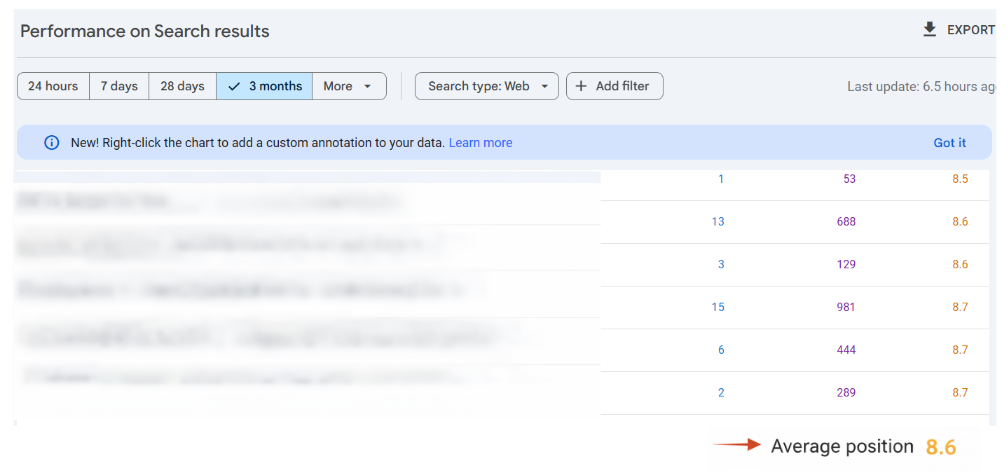
Log into GSC. Go to Performance > Search Results.
Filter by: Position 8–30: You're close to page one
This is where the wins are. These are keywords Google wants to rank you for. You just haven't fully satisfied intent yet.
Step 3: see which page is ranking
Click a keyword → then click "Pages."
This shows which page Google is ranking for that keyword. Check if the page actually matches what people are searching for.
You'll usually see one of three problems:
The page is too general
The keyword is barely mentioned
The topic deserves its own page
Step 4: pick your move
For each keyword, choose one action:
Option A: Expand the existing page (fastest win)
Do this if the keyword is related to the page topic.
Actions:
Add an H2 targeting the exact query
Answer it properly (200–400 words)
Add examples, pricing, local details
Link to that section from other pages
This can move you 5–10 positions in weeks.
Option B: Create a supporting page (bigger wins)
Do this if the keyword has different intent or is more specific.
Example: Page ranks for: "immigration lawyer Sydney" GSC shows: "how much does a partner visa cost" → Create a dedicated cost page and link it from your main page.
This is how firms "suddenly" grow traffic.
Option C: Fix intent mismatch
If the search is informational but your page is salesy (or vice versa), fix it:
Rewrite the intro
Reorder sections
Make intent obvious in the first 100 words
Google often re-ranks within weeks.
Step 5: steal clicks with better titles
Some keywords rank on page 1 but get few clicks. Check if your title tag includes the actual keyword people are searching for.
What is CTR? Click-Through Rate. How many people click your result when they see it.
In GSC:
Filter Position ≤ 10
Look for keywords with low CTR
Rewrite your title tag to match the search term exactly.
Example: Search term: "DUI lawyer Perth" Current title: "Legal Services | Smith Legal" Better title: "DUI Lawyer Perth | Drink Driving Defence | Smith Legal"
Keep it under 60 - 65 characters or it gets cut off.
Small change, big impact on clicks.
What to do now
Do a site: search. Are your key pages indexed?
Log into GSC
Find 3 keywords where you rank positions 8–30
Pick one action for each (expand, create, or fix intent)
Check back in 4 weeks. You'll see movement.
Win 10: fix the technical basics (speed, images, schema)
What is this?
Technical SEO sounds intimidating, but you only need to check a few things. If your site loads slowly or has technical issues, you're losing enquiries before people even read your content.
Step 1: check your page speed
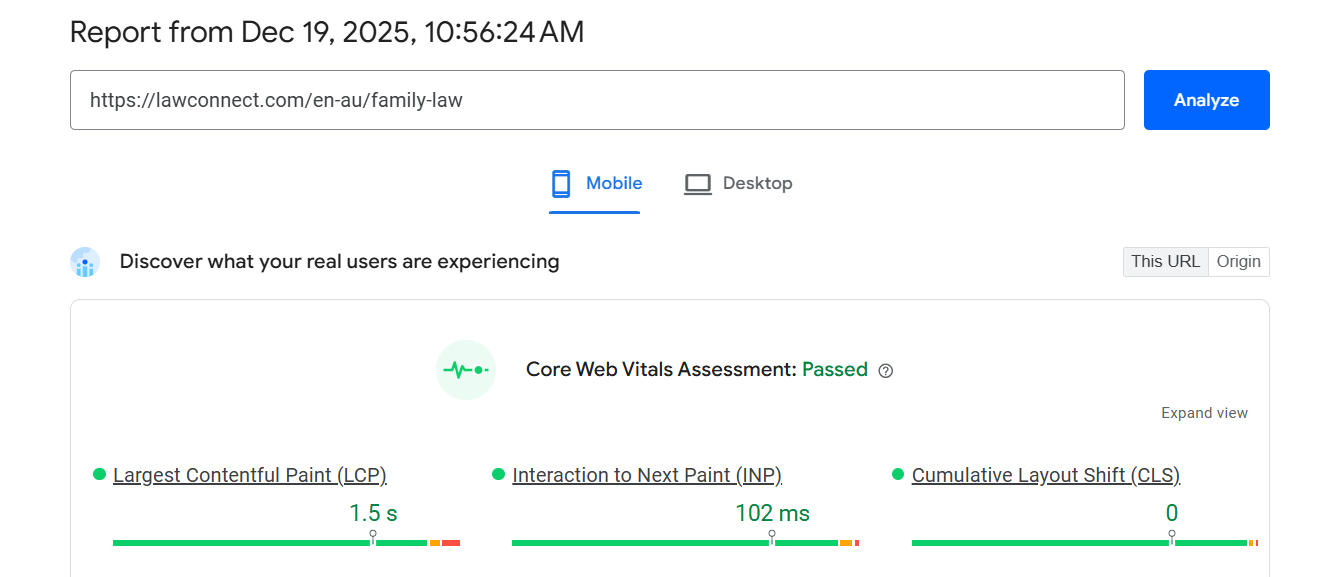
Go to PageSpeed Insights: pagespeed.web.dev
Enter your homepage URL. Google will show you if you pass or fail Core Web Vitals. The metrics that matter for rankings.
If you're failing, it's usually images or code bloat. Fix it or you're invisible on mobile (where 70% of searches happen).
Step 2: compress your images
Heavy images kill page speed. Most law firm websites have 3MB photos when they should be under 200KB.
Easy fix: Use TinyPNG (tinypng.com) or Squoosh (squoosh.app) before uploading images. They compress without losing quality.
Do this for every image on your site. It's the fastest technical win.
Step 3: technical must-haves
Your site needs these (even if you don't understand them):
1. Robots.txt
Tells Google what to crawl. Ask your web person: "Do we have a robots.txt file?"
2. XML Sitemap
A list of all your pages for Google. Usually at: yoursite.com.au/sitemap.xml
3. Structured Data (Schema Markup)
Code that tells Google what your content is. You need:
Attorney Schema
LocalBusiness Schema
FAQ Schema
Review Schema
Breadcrumb Schema
If you're stuck: There are plenty of video tutorials online now for these technical fixes. If you're comfortable following guides, give them a try. Otherwise, contact an SEO agency or web developer. Either way, be careful. One wrong setting can break your site. When in doubt, get someone experienced to help.
Bonus tip: get easy, safe backlinks (no outreach required)
What are backlinks?
Backlinks are links from other websites to yours. Google sees them as votes of trust. The more authoritative the linking site, the better. A link from a reputable legal directory is worth more than 100 links from random blogs.Link building is an essential part of SEO, but you don't need complicated outreach campaigns. Here are backlinks you can get today:
Easy backlinks you can get today
1. LawConnect
Sign up at https://lawconnect.com/en-au . We create a profile page for you that includes a backlink to your site. Bonus: you also get qualified leads from our platform. Win-win. Backlink from a high-authority legal site + client enquiries.
2. Local Chambers of Commerce
Most chambers have member directories with backlinks. Join your local chamber.
3. Local council business directories
Search "[your suburb] business directory" or "[your council] local business listing." Most are free.
4. Yellow Pages / True Local
Create a free listing. Add your website link.
5. LawTap
Another legal directory. Free profile with backlink.
6. Pro bono clinics / legal associations
If you volunteer or are a member of Law Society NSW, Bar Association, Australian Lawyers Alliance, or Community Legal Centres, ask them to link to your site.
7. One reputable article
Write a guest article for a legal publication (Australasian Lawyer, Law Society Journal, state-based legal publications). One quality backlink from a trusted site beats 50 from random directories.
Find local suburb-specific sites
Use ChatGPT or Claude to find relevant local websites where you can get listed:
Prompt: "Find 10 local business directories or community websites in [your area] where a [practice area] lawyer could get listed with a backlink."
You'll find suburb guides, community noticeboards, and regional news sites. Submit your listing.
What NOT to do
Don't buy backlinks. Don't spam. Don't use "$99 for 1,000 links" services. Google penalises this.
Stick to legitimate directories and associations. Slow and safe wins.
Final thoughts: start small, build momentum
Please note: This guide provides general information about SEO strategies for lawyers. It is not legal advice about how to market your practice. Always ensure your marketing complies with your local law society rules and regulations.
You don't need to implement all 10 wins this week. Pick two:
If you want fast results: Start with Win 5 (reviews) and Win 7 (cost page). Both take under an hour and directly impact conversions.
If you want long-term rankings: Start with Win 1 (keywords) and Win 3 (money pages). Build your foundation first.
If you're time-poor: Start with Win 8 (case studies). Turn your last three matters into content using voice notes. It takes 30 minutes total.
Want enquiries while SEO compounds? SEO takes time. If you want matters now while you build long-term rankings, you can also:
Get matched with relevant potential clients based on your practice area and location
Receive enquiries from people actively seeking to speak with a lawyer
Maintain steady cash flow while you improve your website and Google rankings
Get listed on LawConnect in minutes, we’ll set everything up for you. Speak with our team to create your profile and start receiving relevant enquiries while your SEO works in the background.

SEO compounds. One optimised page leads to better rankings, which brings more traffic, which creates more case studies, which builds more authority. Start anywhere. Just start.
If you're looking to scale your lawyer SEO marketing or need help with SEO marketing for law firms across multiple locations, these fundamentals still apply. Whether you're implementing a search engine optimisation law firm strategy as a solo practitioner in Newcastle or a multi-office firm across Sydney, Perth, and beyond.
About the author
This guide was written by Marvin Fathi, a digital marketing and SEO specialist with over 10 years' experience working across multiple industries, including professional services and law firms.
Marvin has worked closely with lawyers to improve local search visibility, increase qualified enquiries, and turn SEO traffic into real client matters. This guide is based on practical strategies that have been tested on real law firm websites, not theory.
Disclaimer:
This content is provided for general informational purposes only. Any examples, figures, keywords, locations, or scenarios mentioned are illustrative and may not reflect current law, outcomes, or typical results. SEO strategies and legal processes vary by practice area, location, and individual circumstances.

Artificial intelligence (AI) is quietly changing how legal help is delivered, making it simpler, faster, and easier to access.



From drafting documents to answering questions, AI is increasingly used in legal settings. Explore how these tools function and what to consider professional guidance.

ChatGPT can summarise documents and explain legal terms, but it wasn’t built for the law. Discover why purpose-built legal AI delivers more accurate, reliable results for legal matters.
